22 September 2026
Zantus Nel - Game Student Journey #3
Follow Zantus Nel, a student in the Game and Interactive Media Development Course 2026, on his student journey and his experiences in class. Zantus wrote this journal for us to share his story and his thoughts with you. In this journal entry he is talking about his experiences throughout the first half of the year studying game and interactive media development.
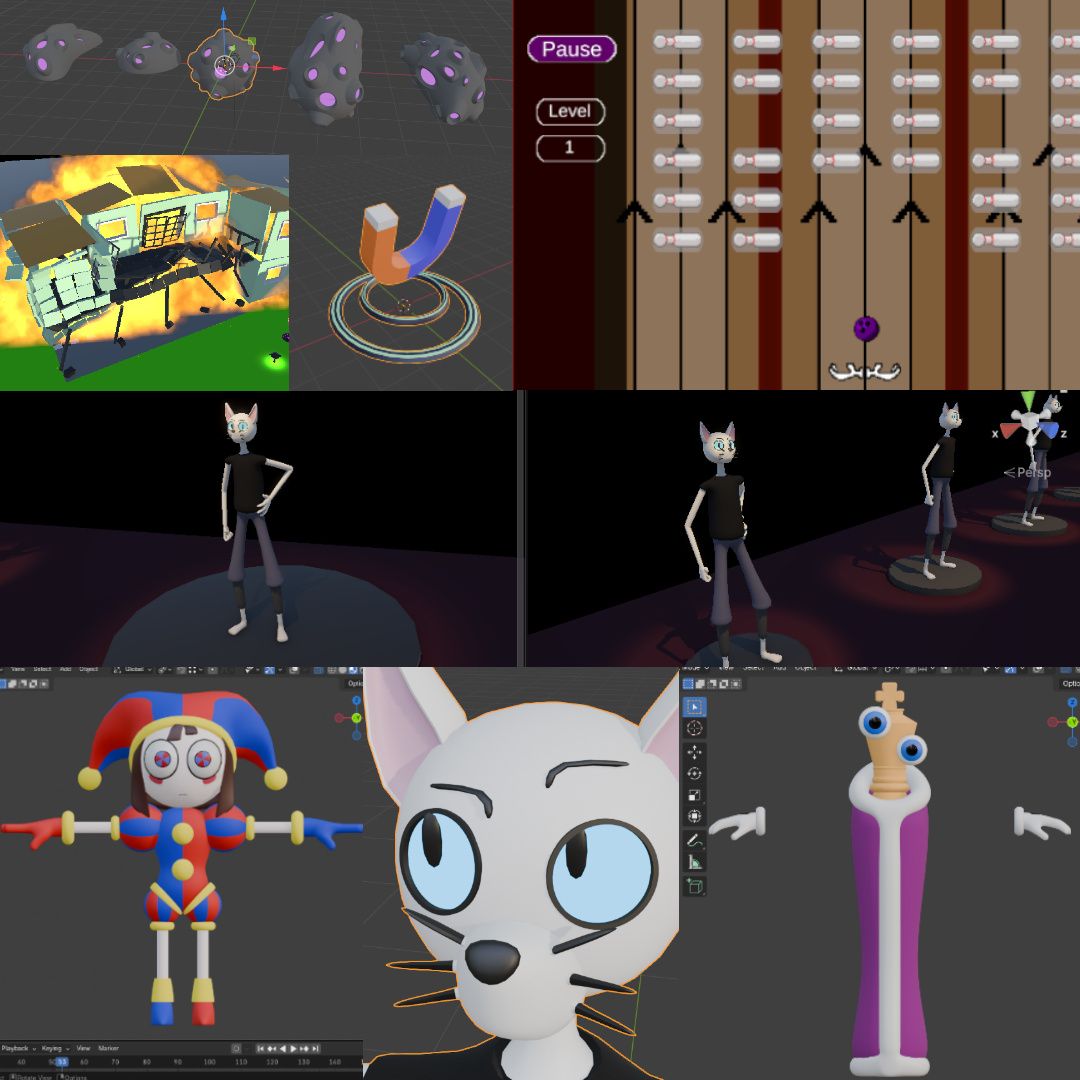
(text edited by editor in collaboration with the student)
Game Engine Basics Introduction
We started by setting up Unity and learning what a game engine actually is and how to work with it. At first, it looked very overwhelming because there were so many different windows and tools, but the lecturer explained everything clearly and I was able to follow along.
One of the first things we worked with was physics. We made simple simulations, like a ball falling and rolling down a hill and a rocket moving through the scene. It was a good way of seeing that the things we were learning could quickly turn into something interactive.
Next, we learned how to create terrain and paint different ground textures onto it. We added a character, fog, lighting and different materials to make the environment look more like an actual game level instead of just a basic test scene.
After that, we started working with Unity assets such as 3D models, visual effects, lights and sounds. Using an asset pack, we built our first proper level and learned how lighting can completely change the mood of an environment. We also experimented with things like mirrors and even a basic security camera system.
Visual effects were something I had been looking forward to. I had some software problems during this part and fell a little behind, but another student helped me catch up. That was also one of the first times I noticed how useful it was to be able to ask other students for help.
We then combined visual effects and sound to create things like a burning torch that you could hear when you moved closer to it. It was interesting to see how several different parts of Unity could work together to make something feel more believable.
Towards the end, we also learned how to create our own assets outside Unity and bring them into the game engine. For one of the exercises, I made a Coke can and prepared it so that textures could be added properly.
Game Graphics – 3D Modelling Introduction
Once we had learned more about 3D modelling in Blender, we did an exercise to prepare for our first larger modelling project.
We had to make a low-poly car using the techniques we had learned so far. I chose the car from the show Supernatural. I really enjoyed this exercise and it made me want to learn more about low-poly modelling.
After finishing the car, we created a small environment for it and took screenshots of the final scene. It was nice being able to put something I had modelled myself into an environment instead of only working on the model by itself.
During this week, I also got the idea for a personal project based on Wednesday Addams after seeing other students discussing their own ideas in our Discord group. I started noticing that the things we were learning in class were giving me ideas for projects I wanted to try on my own.
Then it was project week. We could choose a character and had to model it using everything we had learned so far. I chose Louie Duck from DuckTales.
This project was probably the first time I really doubted whether my work was good enough. The night before submission, I seriously considered starting the whole character again.
Eventually, I decided not to. I had put everything I could into it, and I had to accept that this was where my skills were at that point.
Strangely, handing the project in was probably the most stressful part. Afterwards, I wondered why I had been so nervous.
It was challenging, but also one of the projects that taught me a lot about trusting my own work.
Game Scripting – Introduction to Coding
Coding was something I was worried about from the beginning. I thought I would probably never understand it.
We started with the basic terminology and then learned how to use code to move and rotate objects inside the game engine.
Once I could actually see something on screen moving because of code I had written, it started to make much more sense. It also became a lot more interesting than I had expected.
During the school vacation afterwards, I decided to practise by making a small castle level.
I used an environment asset pack to build the castle and some of the modelling skills we had learned to make characters for it. I then used my coding knowledge to make things move around the level.
It was not an assignment. I mainly did it because I wanted to practise and make sure I did not forget what we had learned earlier.
That helped me realise that different parts of the course were starting to connect. Modelling, game engines and coding were no longer completely separate things.
Game Technology – Game Engine Basics Practice
For this exercise, we had much more freedom to build our own level.
We could use assets we had made ourselves or use existing ones from the Unity Asset Store. I used some of the assets provided during the course and also brought in the R2-D2 model I had made during the modelling module.
I created collectible coins and added an effect to make them glow. I then used some of the coding we had already learned to make the level more interactive.
Two other students tested what I had made and gave me feedback. I used their comments to fix some of the problems they found.
I really liked this part because I was starting to reuse things from earlier modules instead of learning everything separately.
It was also useful being able to ask other students for advice when I got stuck, especially with some of the coding.
Game Design Theory – Creating Worlds
Worldbuilding was quite different from the technical modules.
We looked at how much thought goes into creating a believable game world and how the characters and the world affect each other.
It made me notice things in games that I had never really thought about before. A character's background, where they grew up, what happened to them and why they behave in a certain way can all affect how believable the story feels.
The same is true for the game world. Even if the player only sees a few levels, there still needs to be the feeling that there is a bigger history behind everything.
For the assignment, we were put into teams of four and had to create a worldbuilding document and character sheets.
That meant deciding on the history of our world, what had happened there, who the characters were and why they were part of the story.
There was much more research involved than I expected. At one point, I was not sure if we would finish everything in time, but somehow we managed it.
We also received the next brief shortly before finishing this one, which made that period quite stressful.
It was probably the first time I realised how much planning can happen before anyone even starts building an actual game level.
Game Design Theory – Visual Storytelling and Level Design Basics
The next project continued from the world we had created as a team.
This time, each team member had to design their own level, but all of our levels had to connect to each other and feel like parts of the same place.
Our project was set around a power plant. We had some freedom to decide what was happening in our part of the story and what role the player would have.
This project taught me a lot about teamwork.
It became clear that communication is very important when several people are building different parts of the same game. I also noticed that not everyone communicates in the same way. Some people were more comfortable discussing things one-on-one than speaking in the whole group.
We worked from a shared floor plan so that everyone understood how the different levels connected.
My first attempt did not go very well. I became frustrated with it, deleted everything and started again.
The second version worked much better.
Once the basic level was there, I started adding visual storytelling. I used things like claw marks, notes and effects to give the player clues about what had happened.
I also added things that could be seen from the neighbouring levels. That helped make everything feel like one connected place instead of four completely separate student projects.
This was when I started understanding that level design is not just about making a nice-looking environment. The environment itself can help tell the story.
Game Scripting – Coding Basic Game Features
By the second coding module, we started working with more game-related coding features.
I was still sometimes nervous about asking questions, but I was getting better at speaking up when I did not understand something.
I also learned things from other students. One student showed me another way of controlling UI elements through code, which I thought was really useful.
For the project, we had to choose two classic games and recreate their basic gameplay through code.
I chose Arkanoid and Space Invaders.
I created my own simple graphics and used the coding techniques we had learned to put the games together.
This was difficult. I had to go back and rewatch some of the earlier coding lessons because there were things I could not remember.
But I managed to finish both games.
I was particularly happy with Space Invaders. I could not get the enemies to behave exactly like they do in the original game, but compared with how nervous I had been about coding when we first started, I was happy that I had managed to make a working game myself.
Game Technology – Game Engine Team Project
This was our first time making a complete game as a larger team.
I was excited but also nervous because there were many different jobs and I was not sure where I would fit in.
Eventually, I joined the graphics team because I felt that was where my strongest skills were.
Our game was called Space Express.
The graphics team was responsible for the visual side of the game, including models, visual effects and UI. We each created things such as buildings, spaceships and enemy ships.
We also worked with the same colour palette so that the things created by different people would still look like they belonged in the same game.
I really enjoyed this part. It was different making something knowing that the rest of the team would actually use it in the final game.
I also got to work more with visual effects. I still did not feel like I completely understood them, but I discovered that I enjoyed making them.
I created three different portal effects so the team could choose which one worked best, as well as a meteor effect and debris.
Seeing everything come together into one game was probably the best part.
The project was not perfect, though. One of the problems was that we kept adding new ideas while we were already working on the game.
That made it harder to finish everything on time and the final part of the project became quite stressful.
It was a good lesson for the next project: sometimes you need to stop adding things and concentrate on finishing what you already have.
The project also made me realise that I wanted to improve my coding. I enjoyed working in graphics, but I wanted to understand more parts of the game so that I could help the team in more ways.
Game Graphics – Character Rigging and Animation
Animation was one of the parts of the course I had really been looking forward to.
We started by learning how a 3D character gets a skeleton, or rig, that allows it to move. We then learned how to connect the character model properly to that skeleton.
After that, we started creating actual animations in Blender and learned how to bring those animations into Unity so that they could be used in a game.
For the project, I used one of the characters I had created earlier in the course.
Before I could animate it, I first had to prepare the model properly so that it could work as a game character.
I then created idle, walking, running and jumping animations.
Some parts were quite tricky and needed a lot of adjusting. I also wanted to make a punching animation, but I realised I probably did not have enough time to do it properly.
Once the animations were finished, I brought the character into Unity and set everything up so that the correct animation would play when the character walked, ran, jumped or stood still.
It was satisfying seeing one of my own older characters turn into something that could now move around inside a game.
Break
During the two-week vacation, I wanted to keep practising animation.
I made three characters based on a show I like and used some of the techniques we had learned.
It was mainly for fun, but it also gave me more practice.
By this point, it was interesting to look back and see how much more I could do compared with the beginning of the year.
User Interface Layout & Design Basics
Next, we moved on to user interface design.
Before this, I had not really thought much about how much work goes into the menus, buttons and information you see on the screen while playing a game.
We learned that UI needs to fit the visual style of the game, but it also needs to be easy for the player to understand.
Our earlier team project was used as an example, and we looked at ways its interface could have been improved.
That made the topic easier to understand because it was a game we had actually worked on ourselves.
For one of the exercises, we compared the interfaces of two existing games and explained which parts worked better and why.
I chose Oblivion and Skyrim.
It was another example of learning to look at games differently instead of only playing them.
Game Scripting – Coding Physics
When we returned to coding again, I was actually looking forward to it.
That was already a big change from the beginning of the year, when coding was probably the part I was most worried about.
This time, we worked more with physics and learned how code can react when objects collide with something or enter certain areas.
One exercise was based completely on normal physics. We had to create a kind of chain reaction where one object causes something else to happen, which causes the next thing to happen.
It was a bit like one of those complicated cartoon machines.
For another exercise, I made a system that sorted a group of balls by colour. One special golden ball was moved onto a pedestal, which then lifted it up for the camera.
I enjoyed this because I had to think about how all the objects would move and interact with each other.
Then it was project week.
This time, I felt more confident going into the project because the earlier exercises had gone well.
We had to create an interactive house containing several different systems. These included doors that could open, close and lock, a portal, solar panels, lights that changed between day and night, and a complete day-and-night system.
And then we had to make the house explode.
That was probably my favourite part.
The project had a lot of different pieces and the time felt quite short, but I managed to get all of the important systems working and even improve some of them beyond the basic requirements.
I also noticed that I was asking more questions than I had earlier in the year. That made a big difference whenever I got stuck.
I still became nervous on submission day because I was worried that I would not finish in time.
But I did.
Looking back at how worried I had originally been about coding, I felt much more confident by the end of this project.